


 Satispay
Satispay is an app that allows users to make purchases online and in physical stores, send and receive money, subscribe to services, and save money.
Fabrick Payment Orchestra enables Merchants to accept payments via Satispay, including recurring payments.
Available Satispay products
The current integration enables Merchants to receive payments through three products:
e-money
Satispay’s default product: a Satispay electronic wallet funded by the Customer via IBAN.
meal voucher
Only Merchants with specific MCCs (e.g. food, beverage, groceries) can offer payment with meal vouchers.
To offer this payment method, a Merchant must enable immediate capture of payments.
The maximum number of Meal Vouchers that can be used in a single transaction is 8.
fringe benefit
Only Merchants with specific MCCs can offer payment using fringe benefits.
There are no restrictions regarding the capture type that the Merchant decides to configure on their account to accept this payment method.
Recurring payments are enabled and available for all Merchants.
How it works for merchants
Merchants who want to activate Satispay on their payment page must follow these steps:
Register a business account on the Satispay website

Request the activation of the Satispay payment method from Fabrick Payment Orchestra
Access the Satispay dashboard
, retrieve the Shop Code and the Activation Code, and share them with FabrickWait for confirmation from Fabrick that the payment method configuration has been successfully completed
For Merchants who do not use the payment method selection directly on the Fabrick Payment Orchestra payment page (therefore using an S2S integration), the value to populate in the paymentType tag is SATISPAY.
Further details on how to use this tag are available in the section How to redirect a customer to a payment method.
Fields to send in the request to Satispay
There are no specific mandatory fields that must be sent to Satispay in the request.
Below is an example of a request without specific parameters, which still allows the payment method to be used without issues:
{
"amount": "375.5",
"currency": "EUR",
"shopTransactionId": "Your_Transaction_Id",
"shopLogin": "SHOPLOGIN",
"paymentType": ["SATISPAY"],
"paymentChannel":{
"channelType":["LINK"]
}
}
If you want to start a recurring payments flow, a tokenization request must be sent including the mandatory field SatisPayDescription, as shown in the following example:
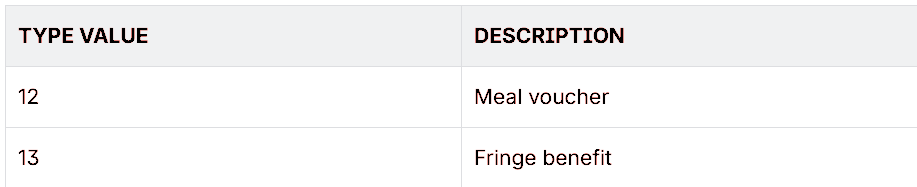
In case of a payment request with Meal Voucher or Fringe Benefit, the parameter OrderDetails.ProductDetails[x].Type can be sent to Satispay with the following values:


Example of a request for a payment using Meal Vouchers:
{
"amount": "65.5",
"currency": "EUR",
"shopTransactionId": "Your_Transaction_Id",
"shopLogin": "SHOPLOGIN",
"paymentType": ["SATISPAY"],
"paymentChannel":{
"channelType":["LINK"]
},
"orderDetails": {
"ProductDetails": [
{
"Name": "Buoni pasto",
"Quantity": "8",
"Price": "64",
"UnitPrice": "8",
"Type": "12"
},
{
"Name": "Acquisto",
"Quantity": "1",
"Price": "1.5",
"UnitPrice": "1.5",
"Type": "1"
}
]
}
}
Example of a request for a payment using Fringe Benefit:
{
"amount": "35",
"currency": "EUR",
"shopTransactionId": "Your_Transaction_Id",
"shopLogin": "SHOPLOGIN",
"paymentType": ["SATISPAY"],
"paymentChannel":{
"channelType":["LINK"]
},
"orderDetails": {
"ProductDetails": [
{
"Name": "Buoni Acquisto",
"Quantity": "2",
"Price": "22",
"UnitPrice": "11",
"Type": "13"
},
{
"Name": "Acquisto",
"Quantity": "1",
"Price": "13",
"UnitPrice": "13",
"Type": "1"
}
]
}
}
Satispay in the test environment
The process to access the Test environment is the same as for Production. It is therefore possible to request access to the Satispay Test environment, along with the Shop Code and Activation Code to be provided to Fabrick, and connect to the Test environment to carry out payment tests.
 Przelewy24